
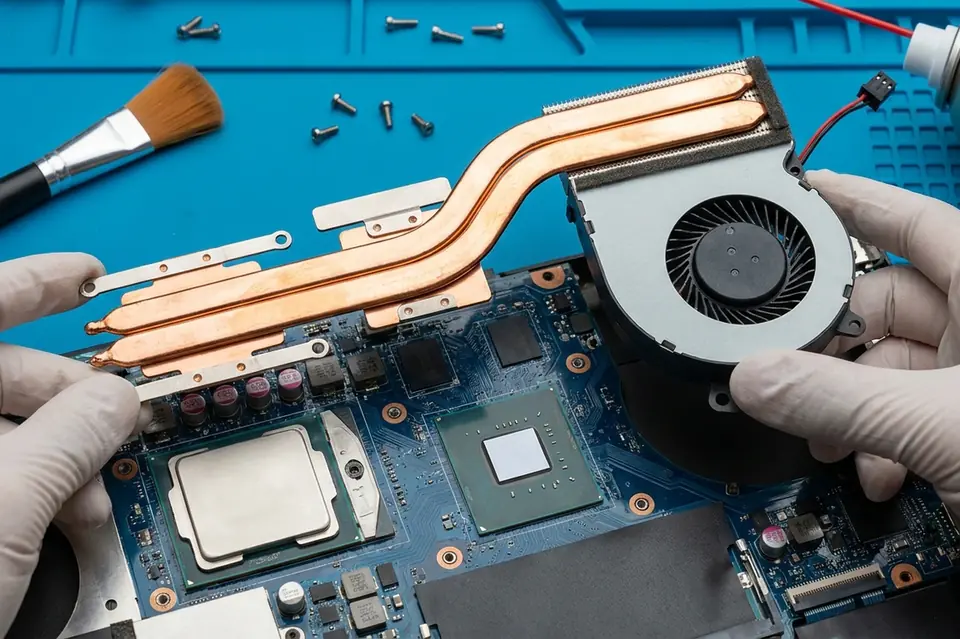
Fan Replacement & Cooling
Laptop Fan Replacement and Cooling Service in Perumbakkam, Chennai
Cooling-system diagnosis, fan replacement and airflow cleaning for laptops with noise, overheating or sudden shutdowns.
Symptoms
Common problems
- The fan is constantly loud, or makes a rattling or grinding noise
- The fan does not spin at all and the machine grows hot
- The laptop becomes uncomfortably warm on the base or near the vent
- Performance drops sharply after a few minutes of use
- The machine shuts down on its own during video calls, games or rendering
- Little or no air comes out of the exhaust vent
What the service involves
Service details
The fan is inspected for bearing wear, obstruction and whether it is receiving its control signal. The heat sink fins are cleared, the exhaust path is checked, and temperatures are observed under load to confirm the cooling is actually working again rather than merely quieter.
Where the fan has failed, a replacement suited to your model is fitted. Where the fan is sound but the airway was blocked, cleaning and fresh thermal compound may be all that is needed — that is covered under deep cleaning and thermal paste service.
Why this service may be needed
Heat is the quiet cause behind a large share of laptop faults. Sustained high temperatures shorten the life of the battery and the board, and a machine that throttles to protect itself feels slow for reasons that no software fix will solve.
Step by step
How the service works
- 1
Contact or visit
Call, message on WhatsApp, or bring the machine to the counter on Nookampalayam Road.
- 2
Initial inspection
The device is checked physically and powered up where possible to see how it behaves.
- 3
Issue identification
Testing narrows the fault down to a part, a board-level problem or a software problem.
- 4
Service recommendation
The finding is explained to you along with what the repair or replacement involves.
- 5
Repair or replacement
Work starts once you agree to it — repair, part replacement, upgrade or reinstallation.
- 6
Testing
The machine is run and checked again to confirm the original symptom is gone.
- 7
Handover
The device is handed back with an explanation of what was done.
Related services
Often looked at alongside this
- Laptop Deep Cleaning & Thermal PasteInternal dust removal and fresh thermal compound on the processor to restore heat transfer and reduce fan noise.
- Laptop & Desktop RepairGeneral diagnosis and repair for laptops, desktops and all-in-one machines that will not start, run slowly or behave unpredictably.
- Motherboard / Chip-Level ServiceBoard-level diagnosis and repair for power faults, shorted circuits and components that have failed on the motherboard itself.
Frequently asked
Questions about laptop fan replacement & cooling service
Something not covered here? Call the counter or send a message on WhatsApp with your model number and the symptom.
Why is my laptop fan so loud all of a sudden?
Usually dust in the fin stack, a worn fan bearing, or higher temperatures forcing the fan to run at full speed. Which of these it is can be seen once the machine is opened.
Is it safe to keep using a laptop whose fan has stopped?
It is not advisable. Without airflow the processor will throttle and the machine may shut down abruptly, and sustained heat is hard on the surrounding components.
Does a cooling pad solve overheating?
It can help a little, but it does not clear a blocked fin stack or replace a failing fan. If the internal airway is obstructed, cooling has to be restored inside the machine.
How often should laptop cooling be serviced?
It depends on where the machine is used. Dusty environments and floor-level desks clog vents much faster than clean, raised workspaces.
My laptop shuts down while gaming. Is that a cooling problem?
It often is. A shutdown under load, with the base hot and the vent barely blowing, is a classic thermal protection response.
Contact Laptech
Need laptop service? Contact Laptech today
Call the counter in Perumbakkam or send the model number and symptom on WhatsApp.